
3D-Sidekick: The 3D Scanning App Built for Orthotists & Prosthetists
Generic scanning apps are built for everyone, which means they’re not really built for anyone. 3D-Sidekick is different: a mobile scanning app designed specifically for O&P professionals, so you get clean, clinic-ready 3D models in seconds instead of fighting software that was never made for your workflow.
Instant, high-precision scans using your iOS device
Compatible with TrueDepth and Structure Sensor hardware
Export-ready STL and OBJ files
Capture photos, forms, and clinical data alongside your scans
3D Scanning
What Is 3D-Sidekick?
3D-Sidekick is a mobile 3D scanning application built for prosthetists and orthotists who need medical-grade accuracy without the complexity of general-purpose scanning tools.
Instead of adapting your clinical process to fit generic software, 3D-Sidekick fits the way O&P clinics actually work: fast captures during appointments, documentation attached to the scan itself, and files that move straight into your CAD or fabrication workflow.
It runs on the hardware you likely already have. Use Apple’s built-in TrueDepth camera for a no-extra-hardware setup, or connect a Structure Sensor when you need it. Either way, every scan is exported in STL or OBJ, ready for CAD design tools or a remote fabrication lab.
Fast & Intuitive Scanning
Reliable, clean, scan-ready models in seconds. No fluff, no lengthy training, no learning curve that slows down your first week with the app.
Clinical-Grade Accuracy
Every scan is engineered for the accuracy O&P work demands, so the model you export is one you can trust for fitting, not one you have to double-check by hand.
Built-In Documentation
Photos, forms, and clinical notes attach directly to the scan, so the patient file and the 3D model live in one place instead of three different systems.
Export Flexibility
STL and OBJ exports mean your scans move straight into the CAD tools and fabrication partners you already use, with nothing to convert or clean up first.
What We Solve
Common Challenges 3D-Sidekick Solves
3D-Sidekick was engineered around the specific friction points prosthetists and orthotists run into with generic scanning tools. If any of this sounds familiar, it’s exactly what we built the app to fix.
Inaccurate Or Cluttered Scans Slow Down Your Workflow
General-purpose scanning apps pick up noise, background clutter, and inconsistent detail. That means rescans, manual cleanup, and appointments that run long.
Complex Software Frustrates Clinicians And Delays Patient Care
Tools built for engineers or 3D artists come with a learning curve your clinical team shouldn’t have to climb just to capture a scan.
Incompatibility With Medical Documentation Systems Increases Admin Time
When your scanning tool and your patient records live in separate systems, someone ends up re-entering the same information twice.
Lack Of Quick Data Capture Disrupts Clinical Workflows
If capturing a scan interrupts the natural flow of an appointment, it gets skipped, rushed, or pushed to “later”, and later rarely happens.
Key Features
Core Features Built for O&P Workflows
3D-Sidekick empowers O&P professionals with precise, fast scanning designed for the realities of a clinical day, not a generic feature list.
Fast & Intuitive Scanning
Get reliable, clean, scan-ready models in seconds, so scanning fits inside the appointment instead of extending it.
Clinical Metadata Attachment
Attach patient photos, forms, and annotations directly to your 3D scans for documentation that stays with the model, not scattered across separate files.
Industry-Standard File Exports
Export your models in STL or OBJ to work instantly in CAD design tools or send to a remote fabrication lab.
Hardware Flexibility
Use Apple’s built-in TrueDepth sensor, or connect external Structure Sensor hardware when your workflow calls for it.
Organized Scan Management
Categorize and review scans through an interface built for a clinical caseload, so finding a patient’s file doesn’t cost you five extra minutes.
How that work
How 3D-Sidekick Works: Capture Precision in 5 Simple Steps
Building a scan into your workflow shouldn’t require a manual. Here’s the full process, from first download to an export-ready file.
Set Up In Under 2 Minutes
Select The Body Part
Scan With Ease
Attach Clinical Files
Export & Integrate
Easy download and setup, so you're scanning fast without heavy training or IT involvement.
Focus your scan on the exact anatomical area you're treating, for accuracy that matches the case.
Sweep across the target area and get a clean, high-quality 3D model instantly, right on your device.
Add patient visuals or notes directly to the scan for documentation that's complete the moment the scan is done.
Export in STL or OBJ and move straight into your 3D design workflow or send the file to your fabrication partner.
Why Sidekick Interactive
Why Orthotists & Prosthetists Choose 3D-Sidekick
3D-Sidekick is designed specifically for the challenges prosthetists and orthotists face with standard scanning tools, so the benefits show up where it counts: at the chair, and at the end of the month.
Fewer Errors, Faster Appointments
Clean captures on the first try mean less scanning friction and fewer redo’s during appointments.
Clean, Compatible Digital Models
Every export is compatible with the industry-standard CAD and fabrication tools your clinic already relies on.
One Workflow for Scans and Documentation
Merging patient documentation and scan data into a single step saves real time across a full day of appointments.
Higher Clinic Throughput
Faster scanning and less admin overhead translate into more patients seen and higher client satisfaction, without adding staff.
Built by a Team That Knows Software, Not Just Scanning
3D-Sidekick is developed by Sidekick Interactive, an app development company that has spent years building custom mobile and web applications for regulated, technical industries. Unlike scanner manufacturers building software as an add-on to hardware, we build software first, which is why 3D-Sidekick focuses on the workflow, not just the capture. It’s part of a broader focus on the O&P space, alongside our work across the Orthotics and Prosthetics industry.
Who We Are
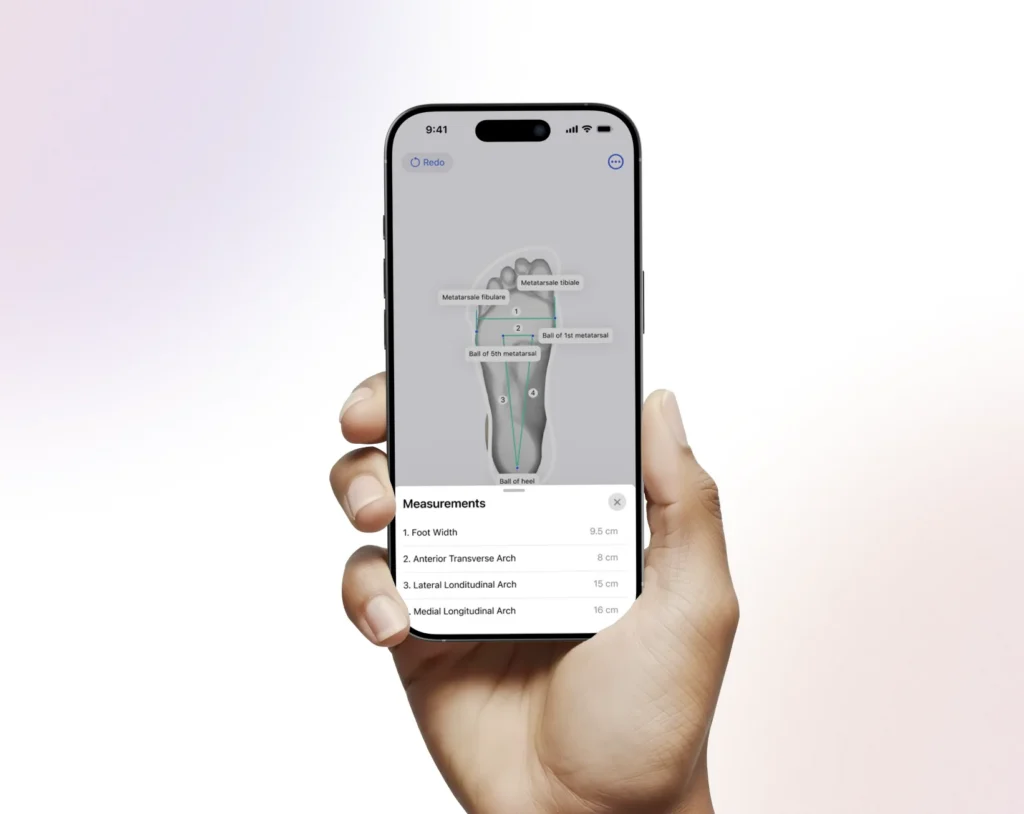
See 3D-Sidekick in Action
Experience the app’s simplicity and power through a real-time look at scanning, file exports, and interface navigation.
Frequently Asked Questions
What Hardware Does 3D-Sidekick Support?
3D-Sidekick is compatible with Apple’s TrueDepth camera and with Structure Sensor hardware, so you can choose the setup that matches your clinic.
What File Formats Are Supported?
Exports are available in STL and OBJ, both widely compatible with prosthetics and CAD design tools.
Can I Attach Clinical Documentation To A Scan?
Yes. You can instantly include photos, forms, or notes with each scan, so documentation and the 3D model stay together.
Is 3D-Sidekick Hard To Set Up?
Not at all. Installation and your first scan happen in under two minutes, with no dedicated IT support required.
Does 3D-Sidekick Replace Plaster Casting?
Yes, that’s the point. 3D-Sidekick replaces plaster and alginate casting with a fast, mess-free digital scan, so patients spend less time in the chair and clinicians spend less time cleaning up afterward.
Who Is 3D-Sidekick Best For?
3D-Sidekick is tailored for orthotists and prosthetists who value accuracy, speed, and a scanning workflow that doesn’t get in the way of patient care.
Let’s talk about your project
Ready to Elevate Your Scanning Workflow?
3D-Sidekick brings medical-grade scanning into your hands, without the complexity. Set it up in minutes and see what a scanning workflow built for O&P actually feels like.